
Geocaching Frequently Asked Questions (FAQ)
We understand how difficult and complicated it can be to understand everything related to geocaching, so we have put together this FAQ to help you understand the game better. You can also look through our Glossary or download our Geocaching 101 presentation.
Please select your question category
|
Geocaching is a worldwide game of hiding and seeking treasure. A geocacher can place a geocache (container) somewhere in the world, pinpoint its location using GPS technology and then share the geocache’s existence and location online. Participants navigate to a specific set of GPS coordinates and then attempt to find the geocache hidden at that location. You pronounce it geo-cashing. The dictionary defined pronunciation is jēōˌkaSHiNG The word Geocaching refers to GEO for geography, and to CACHING, the process of hiding a cache. A cache is a hiding place for concealing and preserving provisions or valuables. The only necessities are:
There are two important aspects to GPSr configuration.
These are the formats used by geocaching.com and you need to set your GPSr up on the same basis. The history of geocaching is available at http://www.geocaching.com/about/history.aspx. You can also find out more about geocaching in South Africa here Groundspeak® is the company that was founded as a means to help further develop and manage the Geocaching.com website. They are responsible for geocaching.com and have also created forums to communicate with the community of geocachers. Groundspeak® has created other GPS-related websites, such as Waymarking.com and Wherigo.com. Groundspeak is located in Seattle, Washington, USA. Find out about visiting them here
The Geocachers' Creed is designed to help orient new players to the ethos of the geocaching community and to guide experienced players in questionable situations, so that everyone can enjoy geocaching! When placing or seeking geocaches, I will:
Find out more at A Muggle is a non-geocacher. Based on Muggle from the Harry Potter series, which is a non-magical person. Usually this term is used after a non geocacher looks puzzled after befriending a geocacher searching for a cache, or when a non-geocacher accidentally finds a cache. Geomuggles are mostly harmless. Geocachers speak their own language, so to help you understand this we have put together a Geocaching Glossary. | |||||||||||||||||||||||||||||||||||||||
|
Geocaches can be found all over the world. It is common for geocachers to hide caches in locations that are important to them, reflecting a special interest or skill of the cache owner. These locations can be quite diverse. They may be at your local park, at the end of a long hike, underwater or on the side of a city street. With almost 14 000 geocaches across South Africa, you're sure to find one in no time. You can search for nearby geocaches by location or by GC Code (a unique code associated with each cache listing) from the geocaching.com homepage or from the search page on geocaching.com.
Grandfathered Cache Types These are geocache types that are still available to find, but no longer available for creation on Geocaching.com. The reasons why each of these types was retired varies.
When you start geocaching, you should start looking for larger containers that are easier to find, and so you should look for caches that are: Cache Type: Traditional Difficulty Rating: 2 Cache Size: Regular or Large You should also check to see that other geocachers have recently logged finds on the cache page (also called the cache listing). This indicates that the geocache is most likely still in place and findable. Find logs are indicated on the cache page with a smiley face. Geocaches vary greatly in size and appearance. In the field you will see everything from large, clear plastic containers to film canisters to a fake rock with a secret compartment. The size is shown on each cache page. Please note that these are just examples; sizes can vary.
There is a geocache rating system to help you understand how difficult a cache is to find. The guidelines for the different ratings are:
There is a geocache rating system to help you understand how difficult a cache is to get to. The guidelines for the different ratings are:
Attributes communicate what to expect at a cache location. Cache owners may identify attributes before submitting a cache listing for review. Identified attributes will appear on the right side of a cache listing page. A full list of attribute icons and their meanings is available here. The hint is meant to help you if you cannot find the geocache after looking for it. To make sure you only decipher and read the hint when you want to, it is encrypted using a simple letter substitution cipher called ROT13. ROT13 means rotated by 13 places, so each letter is replaced by the letter that is 13 letters after it in the alphabet. The geocaching.com site has a decrypt option next to the hint to decrypt the hint for you, or you can do this yourself using the decryption table below.
Please do not move a geocache from its original location. If you feel that the geocache may not be located in the correct location, please email the cache owner directly or post a log on the cache listing page, notifying the owner of your concern. Cache owners are responsible for maintaining their geocache placements. When you find the cache, sign the logbook and return it to the cache. You can take an item from the cache if you like - just make sure to leave something of equal or greater value in its place. The only exception to this is if you find a Trackable, you do not have to trade Trackables. When you are finished, put the cache back exactly as you found it, even if you think you see a better spot for it. Then visit the cache page to log your find and share your experience with others. In its simplest form, a cache always contains a logbook or logsheet for you to log your find. Larger caches may contain a logbook and any number of items (called swag). These items turn the adventure into a true treasure hunt. You never know what the cache owner or visitors to the cache may have left for you to enjoy. Remember, if you take something, leave something of equal or greater value in return. You may also find a Trackable, a geocaching "game piece" that you can learn more about in the Trackables FAQ below. People of all ages hide and seek geocaches, so think carefully before placing an item into a cache. Explosives, ammunition, knives, drugs and alcohol should not be placed in a cache. Respect local laws at all times. Please do not put food or heavily scented items in a cache. Animals have better noses than humans, and in some cases caches have been chewed through and destroyed because of food items in a cache. The logsheet for a nano container is often rolled around a small pin. You can use the magnet in the base of the nano to pull the pin out the nano, and then the rest of the logsheet will follow. Alternatively, have a small pair of tweezers in your geobag, and then it is easy to get the logsheet out. When you roll the logsheet up again, if there is a small metal pin on the logsheet already then make sure you roll it really tight around the pin, otherwise roll it tight with your fingers, or carry a pin in your geobag so that you can roll it around a pin. Then put the logsheet into the lid (which is smaller than the base of the container) so that you can tighten the base back over the lid. If you put it in the base, you will have to force the lid back over the logsheet.
It is important to post a DNF. If a cache owner sees a string of DNFs on the geocache page they will usually check to see if it is still there. Also, it will alert other finders of the possibility that the geocache either is missing or super tough to find.
A Needs Archived log will alert both the local volunteer reviewer and the geocache owner to the issue.
Thanks For The Cache. An acronym written by geocachers in physical cache logbooks or online when logging cache finds. The use of TFTC on its own as a log is often debated. One side of the debate finds this rude, particularly with geocaches that require more work to find. The idea is that if a geocacher spent time putting together a cache for the finder's benefit, the finder owes it to the hider to take a few minutes to say a little more than TFTC. The other side of the debate is that some geocachers use TFTC because they are logging a find from their phone, with the intention of updating the log at home on a computer. With the ease at which geocachers can now log finds using geocaching apps on their phones, there has been an increase of TFTC logs. Since cache owners receive Log Notifications only from the initial log, and not any subsequent edits, they might overlook updates to that log in such a situation. It is also often pointed out that if a geocacher finds a geocache that they were unimpressed or even annoyed with, they may have logged it with nothing more than TFTC as a way to avoid saying anything negative. | |||||||||||||||||||||||||||||||||||||||
|
Members of the geocaching community hide and maintain all of the geocaches in use. You can hide one too! Step 1 - Research the location
Step 2 - Prepare your cache
Step 3 - Place your cache
Step 4 - Submit your cache listing
Step 5 - Maintain your cache
Before considering your first geocache hide, we suggest that you find a variety of caches in your area. Seeing caches in a variety of locations, in different containers and hidden by a variety of users will help you understand what makes a great cache hide. This makes it more likely that you too will hide an interesting cache that everyone will enjoy! As you prepare to place your cache, review the Groundspeak Guide to Hiding a Cache and the Geocache Listing Guidelines. It is important that you understand these guidelines before submitting a cache for review. You should also familiarise yourself with the South African land use agreements and no-go areas, which is available here. Much of the feedback in this article comes from the Reviewers. You can hide a geocache almost anywhere, but remember that you may need permission from the land owner, as all local laws and documented land management policies must apply. Geocaches are not placed in restricted, prohibited or otherwise inappropriate locations. Geocaches are allowed in space, on other planets and in spacecraft. Physical elements of different geocaches should be at least 161 metres apart. You need to hide your geocache container first. When you submit your listing, you are saying to the reviewer that your container is in place and ready to be found. Click here for an article on the Groundspeak forums about some of the South African land use agreements and no-go areas. Much of the feedback in this article comes from the Reviewers. A fundamental guideline of geocaching is that physical elements/stages of a geocache should be at least 161 metres from the physical elements/stages of any other geocache. This is not only to avoid confusion between caches, but also to reduce cache saturation so that you do not have too many in an area, especially sensitive natural areas. There are no limits to what your imagination can come up with in terms of hiding places and container design. However, there are some basic rules that must be followed when hiding a geocache:
Make sure that the container is waterproof, as you don't want the contents getting all soggy. The minimum requirement for a geocache container is that it must contain a logsheet or logbook. If it is a small, regular or large container, add a pencil and some swag to make it more exciting for other finders. People of all ages hide and seek geocaches, so think carefully before placing an item into a cache. Explosives, ammunition, knives, drugs and alcohol should not be placed in a cache. Respect local laws at all times. Please do not put food or heavily scented items in a cache. Animals have better noses than humans, and in some cases caches have been chewed through and destroyed because of food items in a cache. Each cache that is submitted to Geocaching.com is reviewed by a volunteer reviewer to ensure that the cache meets the Geocaching Listing Guidelines. It may take up to seven days for the volunteer to contact you and make your cache live on the web site, especially during busy time periods when many caches are being submitted. Sometimes the reviewer will need to work with you to fine-tune the listing so it can be published. Reviewers strive to begin the review within 7 days of enabling your listing. You may experience longer than normal waiting time in the week following a holiday, or after a large geocaching event. We ask for your patience. Please keep in mind that reviewers are volunteers and sometimes things come up in their lives that delay geocache review. Your reviewer may have questions or concerns which they will post in a log to the geocache page (Reviewer Note). Please read and respond to those questions or concerns. Do this by posting a Reviewer Note on the cache page. All Reviewer notes will delete upon publication. If your enabled listing is not reviewed within seven days after receiving the "Geocache Report Submitted" email, please make sure your geocache listing has been submitted and enabled. Submitted, unpublished geocaches can be seen on your profile page. If a geocache appears under "Your Unpublished Disabled Geocaches", you will need to go to the geocache page and enable the listing. If the geocache does not appear on either list, there may have been an issue with the submission process, and you will want to submit the geocache listing again. It is also possible that the geocache was reviewed, determined to be not publishable and archived by the reviewer. If this happens, you will receive an email alert. For submitted, enabled geocaches that have been awaiting review for more than seven days, please contact the local reviewer through their profile page. Be sure to include the GC code in your message. It is a good idea to verify that you are receiving emails from (sometimes this email is caught by your Spam filter; if so, you can update your Spam settings). To see what email address is associated with your account, visit Your Account Details. Groundspeak relies on the geocaching community to abide by the geocaching guidelines, to ensure that permission for cache placement has been sought and given, to provide accurate coordinates, and to keep the contents family-friendly. An onsite visit is not done. | |||||||||||||||||||||||||||||||||||||||
|
There are many useful things to have in your GeoBag, depending on exactly where you are going caching. These include:
| |||||||||||||||||||||||||||||||||||||||
|
A Trackable is a physical geocaching "game piece." You will often find them in geocaches or see them at geocaching events. Each Trackable is etched with a unique code that can be used to log its movements on Geocaching.com as it travels in the real world. Some of these items have travelled hundreds of thousands of kilometres thanks to geocachers who move them from cache to cache. There are three main types of Trackables:
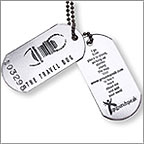
A Travel Bug is a trackable tag attached to an item that geocachers call a "hitchhiker." Each Travel Bug has a goal set by its owner. Goals are typically travel-related, such as to visit every country in Europe or travel from coast to coast. Travel Bug Trackables move from cache to cache with the help of geocachers like you. A Travel Bug looks like this, and there is usually something attached to the chain to customise the Travel Bug (like a key ring, small toy, personalised item, etc.)
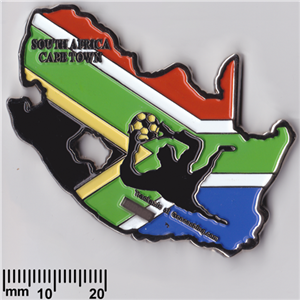
Geocoins are customizable coins created by individuals or groups of geocachers as a kind of signature item or calling card. They function exactly like Travel Bug Trackables and should be moved to another cache, unless otherwise specified by their owners. Many geocachers also collect geocoins, and the only way to see those geocoins is to meet the geocachers, usually at events. Some examples of South African geocoins are:
See more South African geocoins here Other Trackable items come in various forms including patches, key rings, t-shirts, tattoos and car decals. A common feature of Trackable items is that they bear a unique ID tracking code and text noting that they are trackable at Geocaching.com. The Tracking Code (or Tracking Number) is a unique series of letters and numbers used to identify a Trackable. The Tracking Code is normally on the Travel Bug dog tag that is attached to the item, or, in the case of Geocoins, is stamped or etched on the item somewhere (it could even be on the edge of the coin). Make sure to write this number down before dropping the item in another cache. You will need it to locate and move the Trackable online. Enter the Tracking Code at http://www.geocaching.com/track/ to log the Trackable or find out more about the Trackable. You are not required to do anything with the Trackable, but if you would like to interact with it, you have two options.
You can look up the Trackable's goal by entering its unique Tracking Code at www.geocaching.com/track or searching for the Tracking Code on Groundspeak's Geocaching Application. Picking up a Trackable
Dropping off a Trackable Once you log that you have retrieved or grabbed a Trackable, you can drop it into a cache. The cache listing acts as a virtual container allowing you to indicate that you have placed the Trackable in the physical cache. If the Trackable has a goal, please try to follow the goal as best as you can. If the goal is to move the Trackable to the west coast, don't put the Trackable in a cache farther east.
Discovering a Trackable
All the Trackables you have moved or discovered can be seen in your profile. Go to http://www.geocaching.com/profile/ and click on the Trackables tab.
Most owners would rather see their Travel Bug do a lot of travelling, so try not to hold on to a Travel Bug for too long. If you plan on holding onto the bug for more than 2 weeks, make sure to send a courtesy email to the owner letting them know.
| |||||||||||||||||||||||||||||||||||||||
|
We don't want to spoil all the fun you will have solving geocache puzzles, so are unable to give you detailed hints or spoilers or specific advice on a particular puzzle. You should contact the cache owner for help with their own puzzles. However the rest of the FAQ provides some general advice on how to appoach solving a puzzle. Some puzzles are obvious, a crossword puzzle, a sudoku or information that you may just need to just find (like a quiz) to be able to solve the puzzle. Mazes need to be worked through, and mathematical puzzles need to be solved. Barcodes need to be scanned, and ciphers need to be decrypted. Often the internet is a useful source of information should you know what you need to do, and you just need help finding it. Some puzzles appear obvious, but have red herrings in them, or are missing information. Bear in mind that part of the coordinates may be easy to solve, e.g. the degrees part of the coordinates may be obvious, and that may give you the missing information you need to solve the rest. Some puzzles are complicated codes or unique puzzle designs that you will need to solve, and we give you some ideas below to help with those. Other places to look for help are all on the cache listing:
Also remember that recent puzzles listed must be within 3.2km of the listed coordinates, so that also helps you narrow down your solving area (this doesn't apply to old puzzles though, so be aware that there are puzzle caches with the final coordinates 30 or 40 km away in South Africa). If all else fails, ask the Cache Owner for a hint. A puzzle will require you to solve all the digits in the coordinates (14 or 15 in total depending on whether the 0 is included in the E coordinate), the minutes (10) or the decimal minutes (6). Some examples are:
Solving a 15-digit puzzle is often easier as you can use the degrees part of the published coordinates to confirm you're on the right track. Sometimes, the coordinates you need to solve are in the UTM format, e.g. 35J E633255 N7105174, so 15 digits may look very different than expected but still be valid coordinates. Armed with this knowledge, you should look at the puzzle to see if there are 6, 10, 14 or 15 objects, items, words, phrases, lines, etc. in the cache description. This may be where the answer is hidden. Invariably there is a common thread between the items in the puzzle, and you just need to find it. Or there may be a pattern to a list of items, whether the order things were done in, the order they fit together in, there may be dates or other values linked to them or something a bit more obscure that takes longer to solve. Finally, unique puzzles are more of a challenge, and in that case spending time researching everything on the cache page, and looking for any connection, however obscure, until the light bulb goes on is the only way to solve it. Bear in mind that the difficulty rating should give you an idea of how difficult the puzzle is to solve. The first place to start with an image puzzle is to look at the image in fine detail. Zoom into it, and look for content that may be hidden very small in the picture itself. The picture in the background of the cache listing when viewed on a normal web browser on a PC is an image geocachers often forget about, so remember to look at that as part of any image puzzle solving. The background image is not generally seen or remembered when using an app to look at listings or a tablet to view the website. There is more to a picture than the picture itself. Images contain a variety of information hidden in the system data of the image. Look at the image file’s properties or use a photo editing program to look at the EXIF metadata included with the image to see if there is anything hidden in there. Image puzzles may also require you to edit the image somehow, and editing image attributes like the brightness, contrast, colour channels or colour depths may also reveal information. Multiple images may need to be merged correctly. You may need to invert images, or using filters to find hidden content. You need photo editing software to do any of this, and there are several free titles available on the web to help with this. Finally, images may contain other hidden information in the file itself (known as steganography, the science of hiding information), so look at the image file in a text editor, or use google to look for information on ways to hide content in images, you will be surprised how many ways there are to do this. The easiest ones to solve are straightforward substitutions ciphers and often these are substitutions that you are familiar with. It is important to understand that sometime you will solve the numbers themselves, other times you will be solving for the numbers in words, and other times you may only get more information to use once you have solved the code. A series of dots and dashes is likely to be Morse code, lots of X, V and I type characters could be Roman Numerals, and domino looking blocks are likely to be Braille. Spending time just learning and understanding about codes and ciphers will help. Some others to look out for are binary, hexadecimal or ASCII codes. Also consider that a puzzle could simply be in a foreign language. Cell phone keypads have also become a common design for substitution codes. Codes could also be in a variey of symbols, which invariably come from some sort of language or alphabet, but which could be made up for a movie or book or TV series. Some examples here include Tengwar from the Lord of the Rings and Klingon from Star Trek. Often there is a clue in the name of the cache or the listing or the hint to point you in the correct direction. Other ciphers become much more complex, and time and effort researching everything on the cache page will normally lead to a solution in the end. The Vigenere and Keyed Vigenere are examples of these. Websites like Rumkin Cipher Tools or Secret Code Breaker or QuipQuip or Braingle or Omniglot contain many other ciphers to explore. GeocachingToolbox also has puzzle solving tools on it. | |||||||||||||||||||||||||||||||||||||||



 Traditional Geocache - This is the original type of geocache and the most straightforward. These geocaches will be a container at the given coordinates. The size may vary, but at minimum, all of these geocaches will have a logbook. Larger containers may contain items for trade and trackables.
 Mystery or Puzzle Caches - The "catch-all" of geocache types, this type may involve complicated puzzles that you will first need to solve to determine the correct coordinates. Mystery/Puzzle Caches often become the staging ground for new and unique geocaches that do not fit in another category.
 Multi-Cache - These geocaches involve two or more locations, with the final location being a physical container with a logbook inside. There are many variations, but typically once you’re at the first stage, you will receive a clue to the whereabouts of the second stage. The second stage will have a clue for the third, and so on.
 EarthCache - An EarthCache is a special geological location people can visit to learn about a unique feature of the Earth. EarthCache pages include a set of educational notes along with coordinates. Visitors to EarthCaches can see how our planet has been shaped by geological processes, how we manage its resources and how scientists gather evidence. Typically, to log an EarthCache, you will have to provide answers to questions by observing the geological location. For more information about EarthCaches visit
  Letterbox Hybrid - Letterboxing is another form of treasure hunting that uses clues instead of coordinates. In some cases, the letterbox owner has made their container both a letterbox and a geocache and posted its coordinates on Geocaching.com. These types of geocaches will contain a stamp that is meant to remain in the box and is used by letterboxers to record their visit. To read more about letterboxing, visit
  Event Cache - An Event Cache is a gathering of local geocachers or geocaching organizations. The Event Cache page specifies a time for the event and provides coordinates to its location. After the event has ended, it is archived.
 Cache In Trash Out® is the environmental initiative supported by the geocaching community. The main aim of this program is to clean up and preserve the natural areas that we enjoy while geocaching. These events are gatherings of geocachers that focus on litter clean-up, removal of invasive species, planting trees and vegetation and trail building. Learn more at
  Mega-Event Cache - A Mega-Event Cache is an Event Cache that is attended by 500+ people. Mega-Events offer geocachers a day of planned activities. There are often several days of additional activities surrounding a Mega-Event. These large events attract geocachers from all over the world and are often held annually.
 Wherigo™ Cache - Wherigo is a toolset for creating and playing GPS-enabled adventures in the real world. By integrating a Wherigo experience, called a cartridge, with finding a geocache, the geocaching hunt can be an even richer experience. Among other uses, Wherigo allows geocachers to interact with physical and virtual elements such as objects or characters while still finding a physical geocache container. A Wherigo-enabled GPS device is required to play a cartridge. Learn more at
  Lab Caches - Welcome to Geocaching HQ Research & Development. A Lab Geocache is an experimental and extremely rare geocache type. These geocaches are a way for Groundspeak to innovate and test—often at the molecular-level—new ideas to make geocaching even better. By finding a Lab Geocache, you’re helping shape the future of geocaching. The only lab caches published so far were for
  Virtual Cache - A Virtual Cache is about discovering a location rather than a container. The requirements for logging a Virtual Cache vary—you may be required to answer a question about the location, take a picture, complete a task, etc... In any case, you must visit the coordinates before you can post your log. Although many locations are interesting, a Virtual Cache should be out of the ordinary enough to warrant logging a visit.
 or less


 Micro - Less than 100ml. Examples: a 35 mm film canister or a tiny storage box typically containing only a logbook or a logsheet. A nano cache is a common sub-type of a micro cache that is less than 10ml and can only hold a small logsheet.
 Small - 100ml or larger, but less than 1L. Example: A sandwich-sized plastic container or similar.
 Other - See the cache description for information.
 Easy. In plain sight or can be found in a few minutes of searching.
 Challenging. An experienced cache hunter will find this challenging, and it could take up a good portion of an afternoon.
 Difficult. A real challenge for the experienced cache hunter - may require special skills or knowledge, or in-depth preparation to find. May require multiple days / trips to complete.
 Extreme. A serious mental or physical challenge. Requires specialized knowledge, skills, or equipment to find cache.
 Didn't Find It (DNF)
 Write Note
 Needs Maintenance
 Needs Archived
 Will Attend
 Attended





© 2026 Geocachers of South Africa